
Travel and public Wi-Fi
Verify the hotspot, check basic access and inspect connection status. Sensitive activity still needs HTTPS and multi-factor authentication.
Read the preparation steps
Research and remote collaborationMedia and regional multiplayerDevice-first connection planning
Start with the task and device; judge the connection by what it actually does
A task-first choice is easier to evaluate than a long list of region names.
Verify the hotspot, check basic access and inspect connection status. Sensitive activity still needs HTTPS and multi-factor authentication.
Read the preparation stepsCheck the installation options for your TV, console and router. Preserve existing settings instead of changing every device at once.
Review device requirementsTrack usage frequency and concurrent devices, then compare total period costs rather than promotional labels.
Review subscription checksCarrier peering, destination and current load all matter. Compare the regions actually offered in your client using the same task. This illustration is not a live inventory of servers.

For calls and interactive pages, compare responsiveness over time.
For collaboration, check the service location and its access rules.
Compare nearby routes during congestion instead of switching continents repeatedly.

Playback quality · Buffer headroom · Service rules
Video quality depends on the source, platform, decoder and network. Test a lower resolution before comparing regional routes. A connection tool does not guarantee access to licensed regional catalogs.
A short trip, regular study and shared work have different needs. Validate your usual tasks before committing to a longer period.
Validate the task before choosing a period
Verify amounts and applicable conditions on the order confirmation
A single low reading says little about a full session. Compare the same region, time window and network while tracking jitter, packet warnings and update time separately.
 Watch latency variation
Use a practice session to observe latency swings rather than changing routes during a ranked match.
 Separate FPS from ping
Frame-rate drops and network delay have different causes. Check device load before changing the connection.
 Match the game region
Confirm the account and party region. Test patch downloads separately from live multiplayer responsiveness.
If your client offers split routing, review its application or destination rules. Record the original settings, then test local services and remote tasks independently.
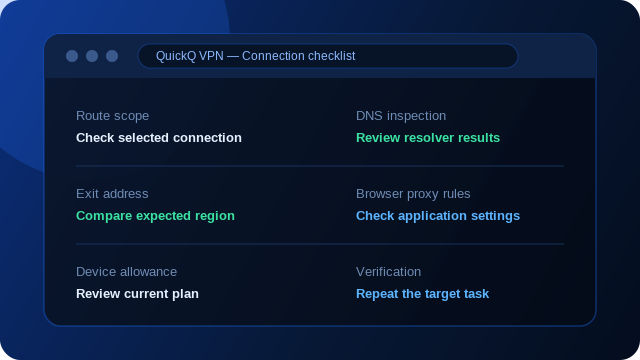
A reputable check can help identify an exit address or unexpected DNS result. It is a clue, not proof of an entire security posture.
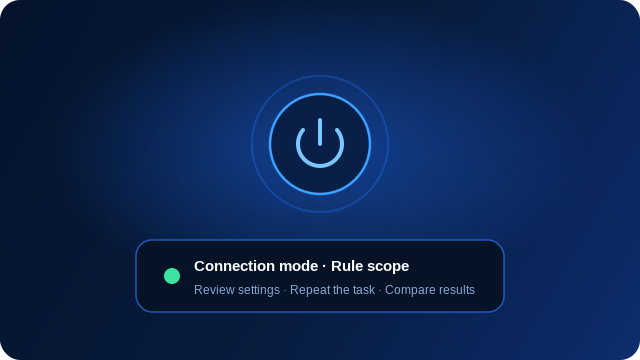
After connecting, verify that the target app follows the intended path. Follow administrator rules on workplace and campus devices.
Keep the device, time window and target task comparable. Change one variable at a time to understand the result.
Open a regular page or short call first to identify faults already present on the local network.
Use the same browser and content, judging task completion rather than only the status indicator.
Keep other settings fixed and observe several time windows after changing a single route.
Share release information, error codes and timing. Redact account details before sending screenshots.
A repeatable task is more useful evidence than a speed slogan without a test method.
Compare research and online tools on the same network; account eligibility and platform policy remain separate requirements.
Note the system, client release and time of failure. Keep passwords and verification codes out of diagnostic material.
Distinguish website access, account records and connection-service data before relying on a privacy claim.
Verify the network source and update your system. A VPN is not a replacement for HTTPS or multi-factor authentication.
Use the same workload to compare routes instead of treating a region label as a quality score.
Available payment methods and final totals belong on the actual order screen. Avoid payment addresses sent by unknown contacts.
These are task examples, not customer testimonials or measured performance claims.
Run a short call, then transfer the same file. Record audio interruptions separately from transfer completion time.

Remote collaboration
Calls and file synchronization
Keep the game region fixed and sample consecutive time windows, looking for sudden latency changes.

Regional multiplayer
Latency consistency
Begin with standard resolution and increase it gradually, checking whether the buffer stays ahead of playback.

Media playback
Resolution and buffering
Reuse search terms and browser settings, checking source pages and citations rather than only the search homepage.

Research work
Retrieval and source checking
A speed test measures transfer capacity; real-time calls are also sensitive to jitter and packet loss. Evaluate them separately.
Signed-in accounts, browser characteristics and platform records may still identify a user. A tunnel does not remove every identity signal.
TVs and consoles may require a different setup. Check vendor guidance before applying a phone installation procedure.
Editorial review: November 29, 2026
Not necessarily. Routing rules, browser proxies and application settings can change the path. Verify the target task separately.
Frame rate depends largely on hardware, heat and graphics settings. A connection tool concerns network paths and cannot promise a higher frame rate.
Carrier peering and congestion can outweigh physical distance. Compare candidates with the same repeatable task.
No. Licensing, regional rules, account eligibility and network conditions can change. Follow the destination service’s terms.
All download actions use this site’s /download.php entry. Device preparation and troubleshooting are covered in the client center and connection handbook.